|
数据搜索系统,热门电子元器件搜索 |
|
|
数据搜索系统,热门电子元器件搜索 |
|
TUSB211 数据表(PDF) 10 Page - Texas Instruments |
|
|
|
|||||||||||||||||||||||||||||
TUSB211 数据表(HTML) 10 Page - Texas Instruments |
|
|
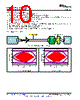
10 / 21 page  Time (ns) 0 0.5 1 1.5 2 -0.4 -0.2 0.0 0.2 0.4 Time (ns) 0 0.5 1 1.5 2 -0.4 -0.2 0.0 0.2 0.4 Agilent 16 GHz Scope USB-IF SMA Fixture TUSB211 EVM B A 2m USB 3.0 cable USB Host A TEST_PACKET transmission 10 TUSB211, TUSB211I, TUSB211-Q1 SLLSEO0C – MAY 2015 – REVISED JUNE 2016 www.ti.com Product Folder Links: TUSB211 TUSB211I TUSB211-Q1 Submit Documentation Feedback Copyright © 2015–2016, Texas Instruments Incorporated 8.2.2.1.2 For a Device Side Application 1. Configure the TUSB211 to the desired EQ setting 2. Power on (or toggle the RSTN pin if already powered on) the TUSB211 3. Connect a USB host, the USB-IF device-side test fixture, and USB device to the TUSB211. Ensure that the USB-IF device test fixture is configured to the ‘INIT’ position 4. Allow the host to enumerate the device 5. Enable the device to transmit USB TEST_PACKET 6. Using SMA cables, connect the oscilloscope to the USB-IF device-side test fixture and ensure that the device-side test fixture is configured to the ‘TEST’ position. 7. Execute the oscilloscope’s USB compliance software. 8. Repeat the above steps in order to re-test TUSB211 with a different EQ setting 8.2.3 Application Curves Figure 2. Eye Diagram Bench Setup Figure 3. TUSB211 Disabled Figure 4. EQ Level 0 |
|
|
链接网址 |
| ALLDATASHEET是否为您带来帮助? [ DONATE ] |
关于 Alldatasheet | 广告服务 | 联系我们 | 隐私政策 | 数据表链接 | 链接交换 | 制造商名单 All Rights Reserved©Alldatasheet.com |
| Russian : Alldatasheetru.com | Korean : Alldatasheet.co.kr | Spanish : Alldatasheet.es | French : Alldatasheet.fr | Italian : Alldatasheetit.com Portuguese : Alldatasheetpt.com | Polish : Alldatasheet.pl | Vietnamese : Alldatasheet.vn Indian : Alldatasheet.in | Mexican : Alldatasheet.com.mx | British : Alldatasheet.co.uk | New Zealand : Alldatasheet.co.nz |
|
Family Site : ic2ic.com |
icmetro.com |
 Chinese ▼
 English
 Chinese
 German
 Japanese
 Russian
 Korean
 Spanish
 French
 Italian
 Portuguese
 Polish
 Vietnamese
 Indian
 Mexican
 British
 New Zealand