|
数据搜索系统,热门电子元器件搜索 |
|
|
数据搜索系统,热门电子元器件搜索 |
|
FT-R41W 数据表(PDF) 14 Page - Panasonic Semiconductor |
|
|
|||||||||||||||||||||||||||||
FT-R41W 数据表(HTML) 14 Page - Panasonic Semiconductor |
|
|
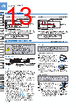
14 / 16 page  Digital Fiber Sensor FX-410 SERIES 180 Selection Guide Fibers Fiber Amplifiers FX-500 FX-100 FX-300 FX-410 FX-311 FX-301-F7/ FX-301-F FIBER SENSORS LASER SENSORS PHOTO- ELECTRIC SENSORS MICRO PHOTO- ELECTRIC SENSORS AREA SENSORS LIGHT CURTAINS / SAFETY COMPONENTS PRESSURE / FLOW SENSORS INDUCTIVE PROXIMITY SENSORS PARTICULAR USE SENSORS SENSOR OPTIONS SIMPLE WIRE-SAVING UNITS WIRE-SAVING SYSTEMS MEASURE- MENT SENSORS STATIC ELECTRICITY PREVENTION DEVICES LASER MARKERS PLC HUMAN MACHINE INTERFACES ENERGY CONSUMPTION VISUALIZATION COMPONENTS FA COMPONENTS MACHINE VISION SYSTEMS UV CURING SYSTEMS Cascading • Make sure that the power supply is off while adding or removing the amplifiers. • Make sure to check the allowable ambient temperature, as it depends on the number of amplifiers connected in cascade. • In case two, or more, amplifiers are connected in cascade, make sure to mount them on a DIN rail. • When the amplifiers move on the DIN rail depending on the attaching condition or the amplifiers are mounted close to each other in cascade, fit them between the optional end plates ( MS-DIN-E) mounted at the two ends. • Up to maximum 15 amplifiers can be added (total 16 amplifiers connected in cascade.) • When connecting more than two amplifiers in cascade, use the sub cable ( CN-71-C□) as the quick- connection cable for the second amplifier onwards. • When connecting amplifiers not close to each other in parallel, be sure to mount the optional end plate ( MS-DIN-E) at both sides of each amplifier or affix the communication window seal of the optional fiber amplifier protection seal ( FX-MB1) to the communication windows. For details, refer to the instruction manual enclosed with the FX-MB1. • When the different LED (red / blue / green) types are connected in cascade, mount the identical models together. • When this product is used with the other digital fiber amplifiers, be sure to place this product to the left most position (When you look from the connector side). If this product is not placed to the leftmost position, this product may not operate properly. • When the setting switch is pressed and held for 2 sec. or more, “SET” mode (mode setting screen) is activated. • If the setting switch is pressed while in “SET” mode, the mode will change. • If the threshold value adjuster is turned while a mode is active, the setting item will change and blink. • When the setting switch is pressed at the item you would like to set, it blinks 3 times and then the setting is confirmed and the mode switches to the next mode. • If the setting switch is pressed and held for 2 sec. or more or do not press any key for 15 sec. while “SET” mode is active, the mode will switch automatically to “RUN” mode. Mode selection Switching output operation Threshold value (sensitivity) adjustment PRECAUTIONS FOR PROPER USE Refer to p.1458~ for general precautions. Cascading method Main cable ( CN-73-C ) (Optional) Sub cable ( CN-71-C ) (Optional) Slide End plate ( MS-DIN-E) (Optional) End plate ( MS-DIN-E) (Optional) Slide Disappears automatically after 2 seconds. Disappears automatically after 2 seconds. (Threshold value) Dismantling Mount the amplifiers, one by one, on the DIN rail. Slide the amplifiers next to each other, and connect the quick-connection cables. Mount the optional end plates ( MS-DIN-E) at both the ends to hold the amplifiers between their flat sides. Tighten the screws to fix the end plates. Loosen the screws of the end plates. Remove the end plates. Slide the amplifiers and remove them one by one. • The operation selection switch can be used to display different output operations (L-ON / D-ON) on the digital display. • When the threshold value adjuster is turned clockwise, the threshold value increases. When the threshold value adjuster is turned counterclockwise, the threshold value decreases. When set to Dark-ON (D-ON) When set to Light-ON (L-ON) Threshold value setting method Check the incident light intensity [in the digital display (red)] when a sensing object is placed in the sensing position. Check the incident light intensity [in the digital display (red)] when the sensing object is removed from the sensing position. Turn the threshold value adjuster to the threshold value [in the digital display (green)] that is the value in between and . (The threshold value is automatically written to the EEPROM.) Sensing object (Incident light intensity) (Incident light intensity) (Threshold value) • If there is a sufficient level of margin in the incident light intensity, the stability indicator (green) will light up. |
|
|
链接网址 |
| ALLDATASHEET是否为您带来帮助? [ DONATE ] |
关于 Alldatasheet | 广告服务 | 联系我们 | 隐私政策 | 数据表链接 | 链接交换 | 制造商名单 All Rights Reserved©Alldatasheet.com |
| Russian : Alldatasheetru.com | Korean : Alldatasheet.co.kr | Spanish : Alldatasheet.es | French : Alldatasheet.fr | Italian : Alldatasheetit.com Portuguese : Alldatasheetpt.com | Polish : Alldatasheet.pl | Vietnamese : Alldatasheet.vn Indian : Alldatasheet.in | Mexican : Alldatasheet.com.mx | British : Alldatasheet.co.uk | New Zealand : Alldatasheet.co.nz |
|
Family Site : ic2ic.com |
icmetro.com |
 Chinese ▼
 English
 Chinese
 German
 Japanese
 Russian
 Korean
 Spanish
 French
 Italian
 Portuguese
 Polish
 Vietnamese
 Indian
 Mexican
 British
 New Zealand