|
数据搜索系统,热门电子元器件搜索 |
|
|
数据搜索系统,热门电子元器件搜索 |
|
M34C02-R 数据表(PDF) 12 Page - STMicroelectronics |
|
|
|||||||||||||||||||||||||||||
M34C02-R 数据表(HTML) 12 Page - STMicroelectronics |
|
|
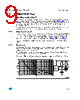
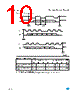
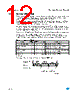
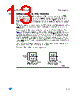
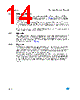
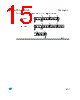
12 / 31 page  Device operation M34C02-W, M34C02-L, M34C02-R 12/31 3.5 Memory Addressing To start communication between the bus master and the slave device, the bus master must initiate a Start condition. Following this, the bus master sends the Device Select Code, shown in Table 2 (on Serial Data (SDA), most significant bit first). The Device Select Code consists of a 4-bit Device Type Identifier, and a 3-bit Chip Enable “Address” (E2, E1, E0). To address the memory array, the 4-bit Device Type Identifier is 1010b; to address the Protection Register, it is 0110b. Up to eight memory devices can be connected on a single I2C bus. Each one is given a unique 3-bit code on the Chip Enable (E0, E1, E2) inputs. When the Device Select Code is received, the device only responds if the Chip Enable Address is the same as the value on the Chip Enable (E0, E1, E2) inputs. The 8th bit is the Read/Write bit (RW). This bit is set to 1 for Read and 0 for Write operations. If a match occurs on the Device Select code, the corresponding device gives an acknowledgment on Serial Data (SDA) during the 9th bit time. If the device does not match the Device Select code, it deselects itself from the bus, and goes into Stand-by mode. Figure 6. Setting the Write Protection Register (WC = 0) Table 3. Operating Modes Mode RW bit WC(1) 1. X = VIH or VIL. Bytes Initial Sequence Current Address Read 1 X 1 START, Device Select, RW = 1 Random Address Read 0X 1 START, Device Select, RW = 0, Address 1 X reSTART, Device Select, RW = 1 Sequential Read 1 X ≥ 1 Similar to Current or Random Address Read Byte Write 0 V IL 1 START, Device Select, RW = 0 Page Write 0 V IL ≤16 START, Device Select, RW = 0 SDA LINE AI01935B ACK WORD ADDRESS VALUE (DON'T CARE) ACK DATA VALUE (DON'T CARE) ACK CONTROL BYTE BUS ACTIVITY MASTER BUS ACTIVITY |
|
链接网址 |
| ALLDATASHEET是否为您带来帮助? [ DONATE ] |
关于 Alldatasheet | 广告服务 | 联系我们 | 隐私政策 | 数据表链接 | 链接交换 | 制造商名单 All Rights Reserved©Alldatasheet.com |
| Russian : Alldatasheetru.com | Korean : Alldatasheet.co.kr | Spanish : Alldatasheet.es | French : Alldatasheet.fr | Italian : Alldatasheetit.com Portuguese : Alldatasheetpt.com | Polish : Alldatasheet.pl | Vietnamese : Alldatasheet.vn Indian : Alldatasheet.in | Mexican : Alldatasheet.com.mx | British : Alldatasheet.co.uk | New Zealand : Alldatasheet.co.nz |
|
Family Site : ic2ic.com |
icmetro.com |
 Chinese ▼
 English
 Chinese
 German
 Japanese
 Russian
 Korean
 Spanish
 French
 Italian
 Portuguese
 Polish
 Vietnamese
 Indian
 Mexican
 British
 New Zealand