|
数据搜索系统,热门电子元器件搜索 |
|
|
数据搜索系统,热门电子元器件搜索 |
|
EV-RADAR-MMIC 数据表(PDF) 8 Page - Analog Devices |
|
|
|||||||||||||||||||||||||||||
EV-RADAR-MMIC 数据表(HTML) 8 Page - Analog Devices |
|
|
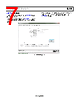
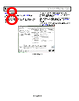
8 / 28 page  UG-866 EV-RADAR-MMIC2 User Guide Rev. B | Page 8 of 28 ADF5901 CONTROLS The ADF5901 Controls tab controls the ADF5901 device settings (see Figure 4). Use the RF Settings pane to control the output frequency. Type the desired output frequency, in MHz, in the VCO Frequency field. To the right of the RF Settings pane, general options are available for the registers of the ADF5901, including calibration control and register readback. When the device initially powers up, click Initialize ADF5901 to perform the initialization sequence as described in the ADF5901 data sheet. Following the initialization sequence, the device powers up and all the ADF5901 blocks calibrate. Figure 4. ADF5901 Controls |
|
|
链接网址 |
| ALLDATASHEET是否为您带来帮助? [ DONATE ] |
关于 Alldatasheet | 广告服务 | 联系我们 | 隐私政策 | 数据表链接 | 链接交换 | 制造商名单 All Rights Reserved©Alldatasheet.com |
| Russian : Alldatasheetru.com | Korean : Alldatasheet.co.kr | Spanish : Alldatasheet.es | French : Alldatasheet.fr | Italian : Alldatasheetit.com Portuguese : Alldatasheetpt.com | Polish : Alldatasheet.pl | Vietnamese : Alldatasheet.vn Indian : Alldatasheet.in | Mexican : Alldatasheet.com.mx | British : Alldatasheet.co.uk | New Zealand : Alldatasheet.co.nz |
|
Family Site : ic2ic.com |
icmetro.com |
 Chinese ▼
 English
 Chinese
 German
 Japanese
 Russian
 Korean
 Spanish
 French
 Italian
 Portuguese
 Polish
 Vietnamese
 Indian
 Mexican
 British
 New Zealand